Why teams want GLM-5.2 on their own metal
GLM-5.2 from Z.ai (Zhipu) is a flagship open-weights model: 744B total parameters in a Mixture-of-Experts (MoE) layout with roughly 40B active per token, plus a marketing headline of up to 1M token context for long-document workflows. Unquantized BF16 weights land near 1.5 TB— firmly cloud-cluster territory. Yet 2026 quantization tooling moved “impossible” local inference into a narrow but real niche for privacy-sensitive coding and research teams who refuse to ship proprietary prompts to third-party APIs.
Two business drivers dominate:
- Data sovereignty — legal, finance, and health-adjacent code stays on-prem.
- Long-context economics — million-token prompts are punishing on metered APIs; amortizing hardware can beat recurring inference bills if utilization is high enough.
This guide focuses on practical local deployment, not benchmark bragging rights.
Hardware reality check by quantization tier
Unsloth’s GLM-5.2 documentation publishes dynamic GGUF tiers (illustrative—verify before procurement):
| Quant | Approx. RAM | Disk | Notes |
|---|---|---|---|
| UD-IQ1_S (1-bit) | ~223 GB | ~90 GB | Aggressive; quality trade-offs |
| UD-IQ2_M (2-bit) | ~245 GB | ~239 GB | Sweet spot for 256 GB unified-memory Macs |
| 4-bit class | ~372–475 GB | ~400 GB | Workstation / multi-GPU |
| 8-bit | ~810 GB | ~800 GB | Datacenter GPUs |
| BF16 full | ~1.5 TB | ~1.5 TB | 8× H100/H200 class clusters |
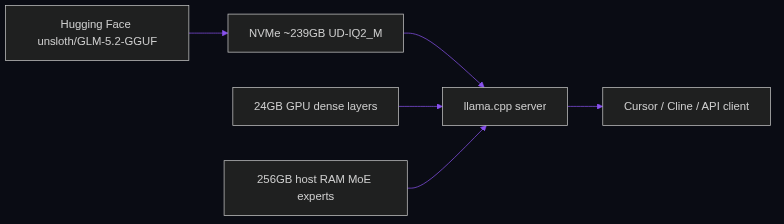
The 2-bit dynamic quant (UD-IQ2_M) is the accessibility anchor: it fits a 256 GB unified-memory Mac Studio (M3/M4 Ultra) or a Linux/Windows box with one 24 GB GPU (RTX 4090/3090) plus 256 GB system RAM using MoE offloading—experts page from host memory while dense attention layers stay GPU-resident. Community reports ( Developers Digest, ComputeLeap ) cite roughly 3–15 tokens/sec on consumer-grade setups—fine for interactive coding, not batch ETL.
For production serving at scale, vLLM / SGLang on 8× H100/H200 with FP8 weights (~750 GB VRAM class) remains the official high-throughput path per deployment guides from the Zhipu ecosystem.
Implementation path A: llama.cpp + MoE offload (maximum control)
- Build llama.cpp with CUDA (
-DGGML_CUDA=ON) or Metal (-DGGML_METAL=ONon macOS). - Download shards from Hugging Face
unsloth/GLM-5.2-GGUF(multi-part GGUF):
huggingface-cli download unsloth/GLM-5.2-GGUF \
  --include "UD-IQ2_M/*" \
  --local-dir ~/models/glm-5-2
- Launch server with expert layers on CPU:
./build/bin/llama-server \
  --model ~/models/glm-5-2/UD-IQ2_M/GLM-5.2-UD-IQ2_M-00001-of-00006.gguf \
  --ctx-size 32768 \
  --n-gpu-layers 999 \
  --ot "exps=CPU" \
  --host 0.0.0.0 --port 8080
The --ot "exps=CPU" override pins MoE expert tensors to host RAM—critical on 24 GB GPUs. Start with 32k context locally; million-token claims require KV-cache planning (q4_0 KV quant can stretch context ~3.5× per Unsloth notes—validate on your workload).
- Point agents (Cursor, Cline, Aider) at
http://localhost:8080/v1OpenAI-compatible endpoints.
Implementation path B: Ollama / LM Studio (fastest start)
Ollama wraps llama.cpp for one-command pulls when local tags exist. As of mid-2026, some GLM-5.2 tags route through cloud backends—verify ollama show modelfile before assuming air-gapped inference. LM Studio offers a GUI path on macOS for teams allergic to shell flags.
Trade-off: less control over batch size, thread count, and per-layer offload than raw llama.cpp—acceptable for MVPs proving private coding assistants before you harden infra.
MoE offloading mechanics (why RAM matters more than VRAM)
GLM-5.2 activates a subset of experts per token. Locally, you are not loading 744B into VRAM simultaneously—you are streaming expert weights from disk/RAM while keeping hot paths on GPU. Memory bandwidth (DDR5 vs unified Apple memory) often caps tok/s more than peak FLOPS. Profile with llama-bench before buying another GPU.
Illustrative KPI targets (measure yours): ≥5 tok/s for interactive codegen acceptance; <250 GB resident RAM at 2-bit quant; P95 prompt eval <60s for 8k-token repo summaries.
When local GLM-5.2 is the wrong bet
Skip local 744B if:
- You lack 256 GB addressable memory and cannot rent cloud GPUs.
- Workloads are bursty (<2 hours/day)—API pricing wins.
- You need SLA-backed 100+ tok/s for user-facing chat.
Prefer smaller local models (Ollama private automation) or hybrid routing (LangGraph agents calling cloud for heavy reasoning, local for PII scrubbing).
MVP rollout checklist
- Proof on 2-bit quant with representative coding prompts (refactors, tests, log triage).
- Disk budget — ~239 GB download + cache; use NVMe, not spinning rust.
- Thermal/power — all-night inference on Mac Studio or Threadripper boxes needs monitoring.
- Fallback API — route to cloud when local queue depth > N.
- Version pin — record exact GGUF revision; re-run eval suite on upgrades.
GLM-5.2 local inference is no longer science fiction—it is infrastructure procurement with eyes open about speed, quant loss, and ops burden. For the right team, it is also the fastest path to a coding model nobody can revoke mid-sprint.
Metrics snapshot
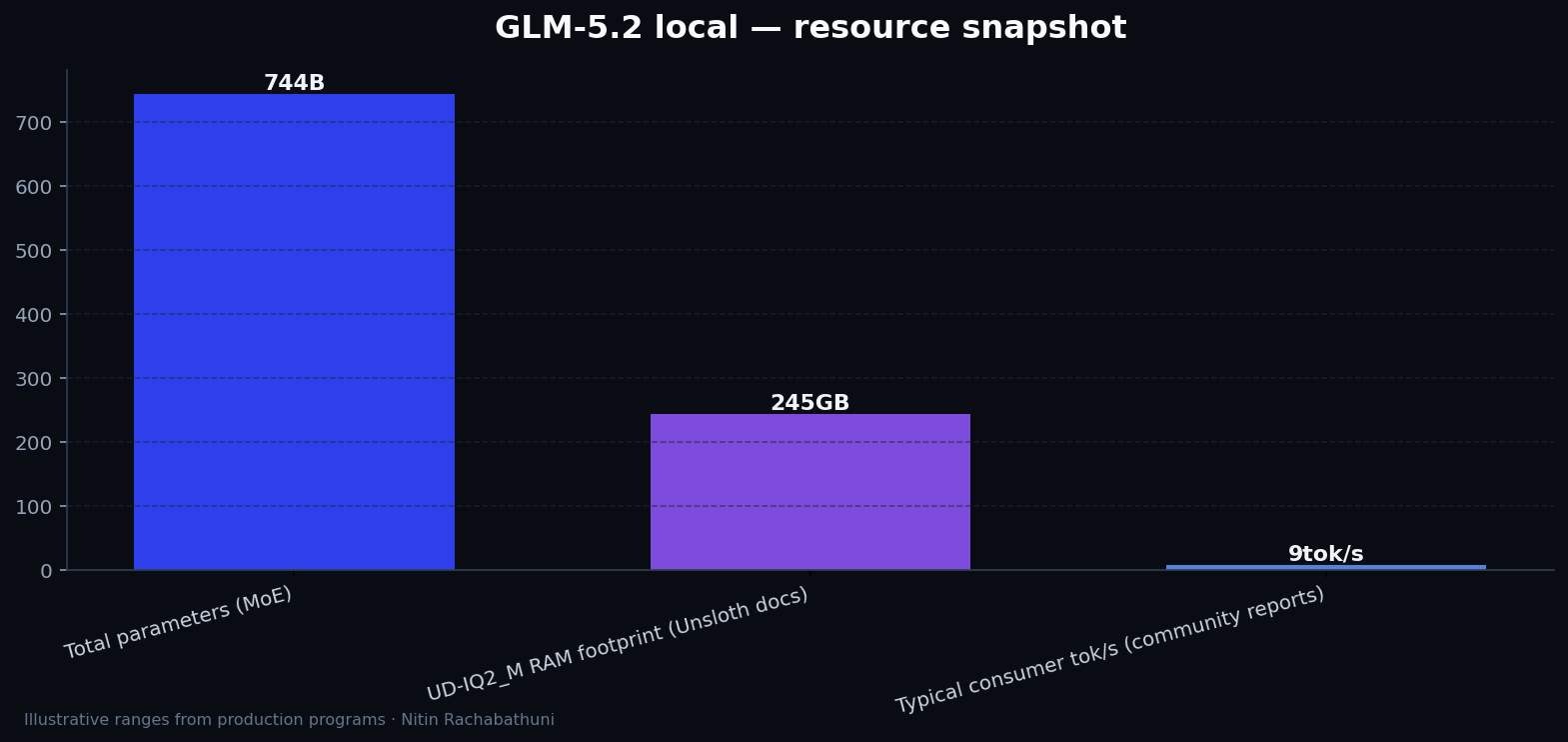
Illustrative GLM-5.2 local deployment footprints from Unsloth GGUF docs—confirm RAM/disk before hardware purchases.
Architecture flow

Approach comparison
| Approach | Signal | Risk | Best for |
|---|---|---|---|
| UD-IQ2_M + llama.cpp MoE offload | Fits 256 GB Mac / GPU+RAM workstation; full control | Single-digit tok/s; heavy download | Private coding on prem |
| Ollama managed runtime | Fastest developer UX | Less offload tuning; tag availability varies | Team MVPs and demos |
| vLLM FP8 on 8x H100 | Production throughput; OpenAI API | ~750 GB+ VRAM class; cloud cost | SLA-backed serving |
Code sketches
/* llama-server with MoE experts on CPU */
./build/bin/llama-server \
  --model ~/models/glm-5-2/UD-IQ2_M/GLM-5.2-UD-IQ2_M-00001-of-00006.gguf \
  --ctx-size 32768 \
  --n-gpu-layers 999 \
  --ot "exps=CPU" \
  --host 0.0.0.0 --port 8080
Official references
Related on this site
- Ollama local LLMs for private automation
- Building AI agents with LangGraph
- LLMs, MCP, and the agentic web
Article slug: how-to-run-glm-5-2-locally · Engineering notes by Nitin Rachabathuni — MVP in 2 days specialist.