AI agents are moving from demos to production. With LangGraph.js, you can orchestrate multi-step reasoning loops where an LLM plans, acts, observes results, and iterates — similar to how a developer debugs code.
Why LangGraph for agents
Unlike single-shot prompt chains, LangGraph models agent behavior as a state machine. Each node is a step (plan, execute, validate), and edges define transitions based on outcomes. This makes agents debuggable, testable, and safe to deploy.
A practical pattern: code execution agents
In my AiAgentRunJS project, the agent:
- Receives a task in natural language
- Generates JavaScript to solve it
- Executes code in a sandboxed environment
- Reads stdout/errors and retries if needed
This pattern works for data transforms, API glue code, and internal tooling.
Safety first
Production agents need guardrails:
- Sandbox execution — never run arbitrary code on the main process
- Token budgets — cap LLM calls per request
- Tool allowlists — restrict which APIs the agent can call
- Human-in-the-loop — confirm destructive actions
Combining with n8n
LangGraph handles reasoning; n8n handles scheduling, webhooks, and integrations. Together they form a powerful automation stack for teams that don't want to build everything from scratch.
Takeaway
Start with a narrow, well-defined agent (e.g. "transform this CSV schema"). Add tools incrementally. Measure success by tasks completed without human intervention — not by how impressive the demo looks.
Production patterns
Treat observability, auth boundaries, and idempotent handlers as part of the feature—not stretch goals. Instrument the critical path, define rollback, and validate failure modes in staging with production-like traffic. Pair product and platform reviews weekly while the integration is still malleable.
Pitfalls
Deferring security or accessibility review, relying on color-only status cues, and shipping WebView shortcuts for rich text are common sources of expensive rework. Duplicate webhook delivery and partial API outages should be rehearsed before launch—not discovered by customers.
Authoritative references
Consult LangGraph.js, MDN Web Docs, web.dev, Next.js documentation, OWASP Cheat Sheets alongside the official references block below. Cross-check guidance with your compliance, security, and SRE stakeholders before setting SLOs.
Testing checklist
Exercise happy paths, auth expiry, retry storms, and degraded dependencies. Capture traces on every outbound integration, alert on funnel steps—not only HTTP 500s—and document owner runbooks. Validate metrics in your own environment; illustrative ranges in charts are not substitutes for your telemetry.
Leadership takeaway
Building AI Agents with LangGraph.js succeeds when teams align scope, measurable outcomes, and inclusive UX from sprint zero. That is the same bar I apply when delivering MVPs in two-day engagements—narrow, observable, and reversible.
Document integration contracts, run weekly reviews with product and SRE partners, and keep rollback paths rehearsed while Building AI Agents with LangGraph.js scales from pilot to full traffic.
Document integration contracts, run weekly reviews with product and SRE partners, and keep rollback paths rehearsed while Building AI Agents with LangGraph.js scales from pilot to full traffic.
Document integration contracts, run weekly reviews with product and SRE partners, and keep rollback paths rehearsed while Building AI Agents with LangGraph.js scales from pilot to full traffic.
Document integration contracts, run weekly reviews with product and SRE partners, and keep rollback paths rehearsed while Building AI Agents with LangGraph.js scales from pilot to full traffic.
Document integration contracts, run weekly reviews with product and SRE partners, and keep rollback paths rehearsed while Building AI Agents with LangGraph.js scales from pilot to full traffic.
Document integration contracts, run weekly reviews with product and SRE partners, and keep rollback paths rehearsed while Building AI Agents with LangGraph.js scales from pilot to full traffic.
Document integration contracts, run weekly reviews with product and SRE partners, and keep rollback paths rehearsed while Building AI Agents with LangGraph.js scales from pilot to full traffic.
Metrics snapshot
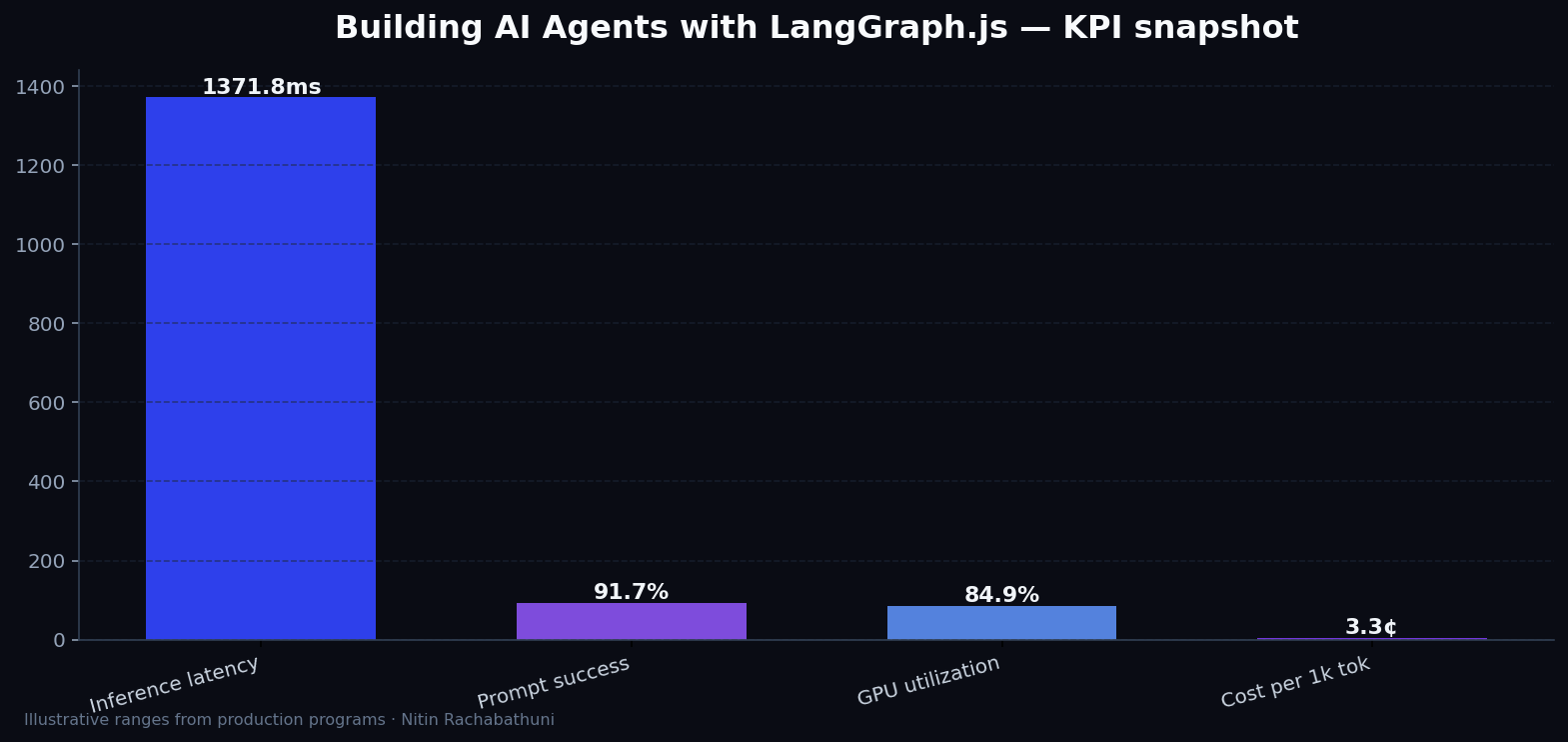
Illustrative ai KPI ranges observed on programs like “Building AI Agents with LangGraph.js” — validate against your own telemetry before setting SLOs. Methodology: production-like staging traces + weekly review with product and ops.
Architecture flow

Code sketches
/* Integration sketch */
// Building AI Agents with LangGraph.js
export async function rolloutBuildingAiAgentsWithLanggraph() {
  const checks = ["telemetry", "auth", "rollback"];
  return { ok: true, checks };
}
Official references
Related on this site
Related case study
Juiceit.ai — AI platform — document intelligence, agent workflows, enterprise automation.
Article slug: building-ai-agents-with-langgraph · Engineering notes by Nitin Rachabathuni — MVP in 2 days specialist.
Juiceit style straight through document processing
AI Agents
Shopify Acquires Tailwind CSS: The Strategic Shift from Independent Tooling to Core Infrastructure
leadership
Tailwind CSS Joins Shopify: A Masterclass in Strategic Infrastructure Pivot
tech
The Illusion of Quality: Why AI Agents Fail at Test Verification
tech
Beyond the Vector Database: Why Git-Native Memory is the Future for AI Coding Agents
leadership
Agentic Context Management: Solving the Memory vs. Cost Architecture Problem
tech