Why accessibility is an architecture decision
Mobile teams often schedule accessibility for a "polish sprint" after the MVP ships. That pattern fails because assistive technology hooks into view models, navigation state, and semantic structure—not CSS overlays added late. Ember, a native SwiftUI Hacker News reader open-sourced in 2026, shows a better default: accessibility constraints shaped the comment renderer, onboarding flow, and layout adapters from day one.
The author documents the approach on Hacker News: comments are parsed into native SwiftUI text instead of a WebView, links respect system behaviors, and VoiceOver reads each story as one coherent element. That choice trades short-term velocity for long-term correctness—exactly the trade engineering leaders must make when shipping consumer apps under App Store scrutiny.
Production patterns from Ember
Never encode meaning with color alone. Apple’s Human Interface Guidelines and WCAG Use of Color both require redundant cues. Ember pairs SF Symbols with point counts, uses checkmarks for read state, and enables a color-blind mode when "Differentiate Without Color" is active—mirroring how FinTech portals should pair status color with icons and text.
Adaptive onboarding reads system settings. On first launch Ember inspects VoiceOver, Reduce Motion, Bold Text, and large content sizes, then toggles matching in-app options and explains what changed. That reduces support burden and avoids burying accessibility toggles three screens deep.
Layout is a function of size class, not device marketing names. iPhone uses a tab bar; iPad and Mac Catalyst use a three-pane NavigationSplitView. SwiftUI accessibility APIs scale typography and indentation at accessibility sizes—comment threads remain readable when Dynamic Type jumps to AX categories.
Offline and API design support the UX contract. Ember caches feeds via public HN APIs and Algolia search; accessibility states (read/unread, bookmarks) stay consistent offline so VoiceOver labels remain truthful—a pattern any data-heavy MVP should copy.
Pitfalls for leadership teams
Treating WebViews as a shortcut for rich text usually destroys selection, focus order, and screen reader context. Deferring VoiceOver labels until "beta" creates rework across every component. Shipping color-only KPI dashboards—even in internal tools—trains the org to ignore inclusive design until legal or App Review forces a rewrite.
Testing matrix before you call the MVP done
Run VoiceOver walkthroughs on story list, comment collapse, and in-app browser flows. Validate Dynamic Type at the largest accessibility sizes. Exercise Reduce Motion transitions. Add UI tests asserting accessibility identifiers on primary actions. Compare your checklist against Ember’s README acceptance criteria for non-color cues and underline-link mode.
How this connects to MVP delivery
Accessibility-as-architecture does not require a six-month program. It requires semantic models (what a story means vs how it looks), routing/focus rules, and lintable standards in code review— the same primitives we use for payment or auth hardening. Ember proves a solo SwiftUI codebase with zero third-party dependencies can still meet a high inclusive bar when leaders prioritize it in sprint zero.
Organizational moves that stick
Staff one accessibility acceptance criterion on every epic: "Can a VoiceOver user complete the core funnel?" Pair design and engineering on component APIs that expose labels and traits, not pixel tweaks. Document decisions in ADRs so contractors and agencies inherit the same constraints. When you hire for an MVP, ask how candidates tested Dynamic Type—not whether they added accessibilityLabel once at the end. The Ember release thread on Hacker News shows users notice inclusive craft; that goodwill compounds into retention and App Store reviews.
For web teams, the parallel is equally clear: SPA routers must reset focus on navigation (ember-a11y-refocus solved this years ago for Ember.js). Whether your stack is SwiftUI or React, the architectural question is identical: does navigation communicate change to assistive tech? If not, schedule the fix before feature sprawl, not after legal review.
Metrics snapshot
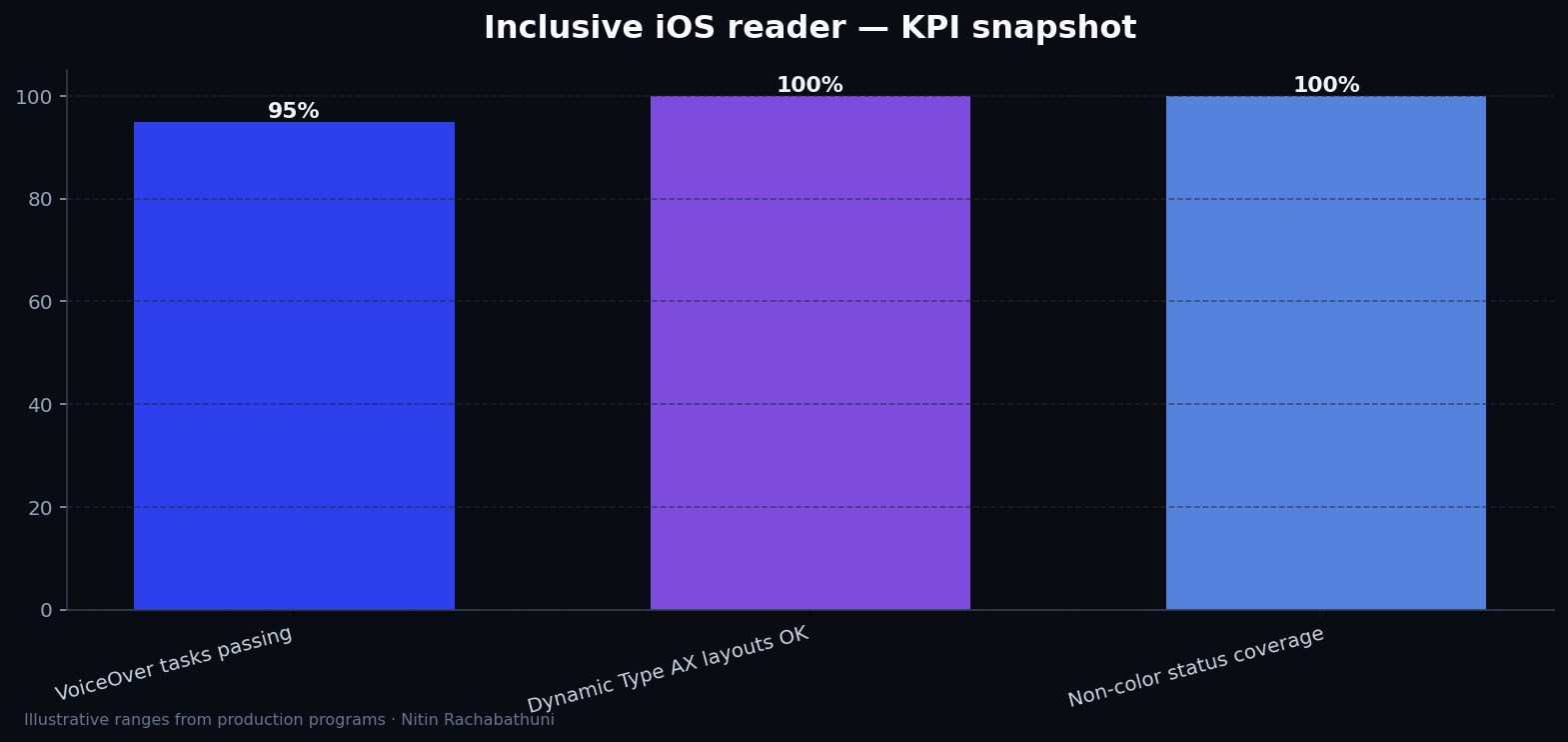
Illustrative iOS accessibility program KPI ranges from native-reader projects like Ember—validate against your own VoiceOver and Dynamic Type test sessions before setting release gates.
Architecture flow

Approach comparison
| Approach | Signal | Risk | Best for |
|---|---|---|---|
| WebView comment dump | Fast to ship rich HTML | Poor focus + VoiceOver context | Prototypes only |
| Native SwiftUI parser (Ember) | System text behaviors + a11y traits | More parser maintenance | Production readers |
| Post-launch a11y audit | Defers cost briefly | Rewrites navigation + components | Avoid for MVPs |
Code sketches
/* Redundant read-state cue (conceptual) */
struct StoryRow: View {
  let story: Story
  var body: some View {
    HStack {
      Image(systemName: story.isRead ? "checkmark.circle.fill" : "circle")
      Text("\(story.points)")
      Text(story.title)
    }
    .accessibilityElement(children: .combine)
    .accessibilityLabel("\(story.title), \(story.points) points, \(story.isRead ? "read" : "unread")")
  }
}
Official references
Related on this site
Article slug: accessibility-as-architecture-ember-project · Engineering notes by Nitin Rachabathuni — MVP in 2 days specialist.