Overview
Creating a user-friendly and accessible website is crucial for ensuring that visitors can easily navigate and engage with your content. By optimizing usability and accessibility, you can enhance the overall user experience and reach a wider audience. Here are some effective strategies to improve your website's usability and accessibility:
-
Clear Navigation: Implement a well-organized and intuitive navigation menu that helps users easily find the information they need. Use descriptive labels and hierarchical structures to guide visitors through your site.
-
Responsive Design: Ensure your website is mobile-friendly and responsive across various devices and screen sizes. This will enable users to access your content seamlessly, regardless of the device they're using.
-
Readable Fonts and Contrast: Choose legible fonts and maintain a sufficient contrast between the text and background colors. This makes the content easier to read, especially for users with visual impairments.
-
Alternative Text (Alt Tags): Add descriptive alt tags to all images, providing text alternatives for visually impaired users or when images cannot be loaded. Alt tags also improve search engine optimization (SEO) by making your content more accessible to search engines.
"Accessibility is the ability to access and benefit from a system, regardless of disability or impairment." - W3C Web Accessibility Initiative
-
Captioned Media: Include captions or transcripts for videos and audio content to ensure that users with hearing impairments can comprehend the information being conveyed.
-
Consistent Layout and Design: Maintain a consistent design across your website, including headers, footers, and navigation elements. Consistency helps users navigate and understand your site's structure more easily.
-
Forms and Interactive Elements: Design forms and interactive elements with clear instructions and error messages. Ensure they are keyboard accessible, allowing users to navigate without relying solely on a mouse.
By implementing these strategies, you can significantly improve the usability and accessibility of your website, making it more inclusive and user-friendly. Remember, an accessible website benefits all users, regardless of their abilities, and contributes to a positive online experience for everyone.
Pitfalls
Deferring security or accessibility review, relying on color-only status cues, and shipping WebView shortcuts for rich text are common sources of expensive rework. Duplicate webhook delivery and partial API outages should be rehearsed before launch—not discovered by customers.
Authoritative references
Consult Next.js documentation, MDN Web Docs, web.dev, Next.js documentation, OWASP Cheat Sheets alongside the official references block below. Cross-check guidance with your compliance, security, and SRE stakeholders before setting SLOs.
Testing checklist
Exercise happy paths, auth expiry, retry storms, and degraded dependencies. Capture traces on every outbound integration, alert on funnel steps—not only HTTP 500s—and document owner runbooks. Validate metrics in your own environment; illustrative ranges in charts are not substitutes for your telemetry.
Leadership takeaway
Ways to improve usability and accessibility succeeds when teams align scope, measurable outcomes, and inclusive UX from sprint zero. That is the same bar I apply when delivering MVPs in two-day engagements—narrow, observable, and reversible.
Document integration contracts, run weekly reviews with product and SRE partners, and keep rollback paths rehearsed while Ways to improve usability and accessibility scales from pilot to full traffic.
Document integration contracts, run weekly reviews with product and SRE partners, and keep rollback paths rehearsed while Ways to improve usability and accessibility scales from pilot to full traffic.
Document integration contracts, run weekly reviews with product and SRE partners, and keep rollback paths rehearsed while Ways to improve usability and accessibility scales from pilot to full traffic.
Document integration contracts, run weekly reviews with product and SRE partners, and keep rollback paths rehearsed while Ways to improve usability and accessibility scales from pilot to full traffic.
Metrics snapshot
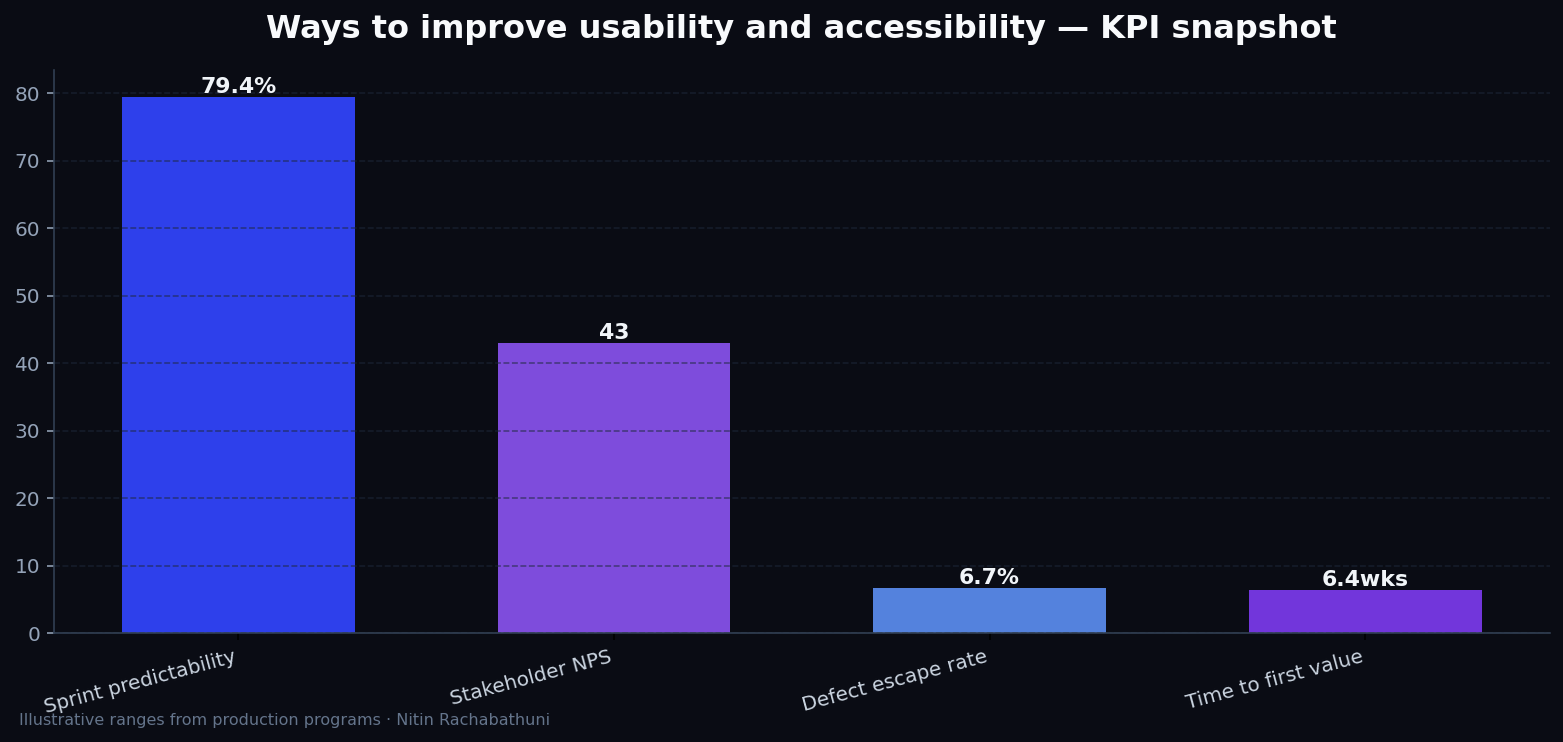
Illustrative consulting KPI ranges observed on programs like “Ways to improve usability and accessibility” — validate against your own telemetry before setting SLOs. Methodology: production-like staging traces + weekly review with product and ops.
Architecture flow

Code sketches
/* Integration sketch */
// Ways to improve usability and accessibility
export async function rolloutWaysToImproveUsabilityAndAccessibility() {
  const checks = ["telemetry", "auth", "rollback"];
  return { ok: true, checks };
}
Official references
Related on this site
Article slug: ways-to-improve-usability-and-accessibility · Engineering notes by Nitin Rachabathuni — MVP in 2 days specialist.