The Fallacy of the "Better" Model
In the rapidly evolving landscape of Generative AI, it is easy to fall into the trap of comparing models as if they exist on a linear scale of quality. When a new open-source model—be it Llama 3, Mistral, or Qwen—is released, the immediate instinct for many developers is to ask: "Is this better than Claude Opus?" or "Can this beat GPT-4o?"
The reality of production engineering is far more nuanced. A local model isn't a "worse" version of a frontier model; it is a different instrument entirely. Comparing them directly is like comparing a high-end industrial lathe to a precision surgical scalpel. Both are incredible tools, but they serve fundamentally different purposes in the workshop.
When you move from experimentation to production, your primary concern shouldn't be "which model is smarter?" but rather "which tool fulfills this specific requirement with the least amount of friction and cost?" By understanding the trade-offs between local infrastructure and frontier APIs, teams can build more resilient, scalable, and cost-effective AI systems.
The Trade-off: Reasoning vs. Utility
Frontier models (like Claude 3.5 Sonnet or GPT-4o) are designed for high-level reasoning. They excel at following complex instructions, handling nuanced creative writing, and solving multi-step logic problems where the "path" to the answer isn't linear. You pay for this capability with higher latency, higher costs per token, and a lack of total control over the underlying weights or data privacy.
Local models (typically those in the 7B to 70B parameter range) offer different advantages:
- Predictability and Speed: For tasks like sentiment analysis, named entity recognition (NER), or formatting JSON outputs from raw text, a local model can often perform just as well as a frontier model but at a fraction of the cost and with significantly lower latency.
- Data Sovereignty: For industries like healthcare or finance, keeping data within your own VPC is non-negotiable. Local models allow you to process sensitive information without it ever leaving your infrastructure.
- Iterative Refinement: If you are building a feature that requires thousands of calls per hour—such as indexing an entire codebase for RAG (Retrieval Augmented Generation)—using a frontier model can become prohibitively expensive and slow. A local, optimized model is the superior choice here.
Engineering Workflows: When to Go Local
To decide which path to take, you must map your specific technical requirements against the capabilities of each "tool." Here are three common scenarios where local infrastructure outperforms frontier models:
1. High-Volume Data Processing
If your application requires processing millions of lines of text to categorize data or extract entities, a frontier model is often overkill. You don't need a "genius" to identify that a piece of text contains an email address; you just need a reliable system. A local model can be fine-tuned on your specific schema to provide consistent results at a much lower marginal cost.
2. Real-Time Interaction
For applications requiring sub-second responses—such as autocomplete features, real-time chat assistants, or interactive coding tools—the latency of an external API call can break the user experience. Local models running on optimized hardware (like H100s or even high-end consumer GPUs) provide the "snappy" feel necessary for seamless UX.
3. Specialized Domain Knowledge
Sometimes, a smaller model that has been fine-tuned on specific domain data (e.g., legal documents, medical records, or proprietary codebases) will outperform a general-purpose frontier model because it is less likely to hallucinate outside of its specialized scope.
Implementation Strategies for Production
When moving toward production, your strategy should be based on evidence rather than hype. You shouldn't choose a model based on what the "launch blog" says; you should choose it based on how it performs on your specific prompt mix.
To build a robust system, consider these three engineering principles:
- Benchmark Your Specifics: Don't look at general benchmarks (like MMLU). Run your actual production prompts through both a local model and a frontier model to see where the "break point" lies for each.
- Log Everything: Always log the
model_id, theprompt_version, and thelatencyof every production call. This allows you to identify exactly when a model is failing or becoming too expensive. - The Canary Approach: Before rolling out a new local model as your primary engine, run it on low-risk endpoints (like internal tools) to ensure its outputs remain consistent before replacing an established frontier API.
If you are looking to build a production-ready AI MVP and need help navigating these architectural trade-offs or setting up the right infrastructure for your specific use case, get in touch for expert consultation.
Conclusion: The Right Tool for the Job
The goal isn't to find the "best" model; it's to build the best system. By recognizing that local models offer specialized capabilities—speed, privacy, and cost-efficiency—while frontier models provide high-level reasoning, you can architect a hybrid approach. Use the frontier models where human-like nuance is required, and deploy local infrastructure where scale and precision are the priorities.
FAQ
Q: Is it worth spending time fine-tuning a local model? A: Yes, if you have a high volume of data and need consistent output for a specific task (like classification or extraction). Fine-tuning allows a smaller model to perform at a "frontier" level within its specific domain.
Q: How much hardware is needed to run a 70B parameter model locally? A: To run a 70B model with decent quantization, you typically need multiple high-VRAM GPUs (like the A100 or H100) or several consumer cards linked together. The specific requirements depend on the level of quantization used.
Q: Can local models handle complex reasoning as well as Claude? A: Generally, no. While they are improving rapidly, frontier models currently hold the edge in multi-step logic and nuanced instruction following. Use them for "thinking" tasks and local models for "doing" tasks.
Authoritative references
Consult Next.js documentation, MDN Web Docs, web.dev, Next.js documentation, OWASP Cheat Sheets alongside the official references block below. Cross-check guidance with your compliance, security, and SRE stakeholders before setting SLOs.
Metrics snapshot
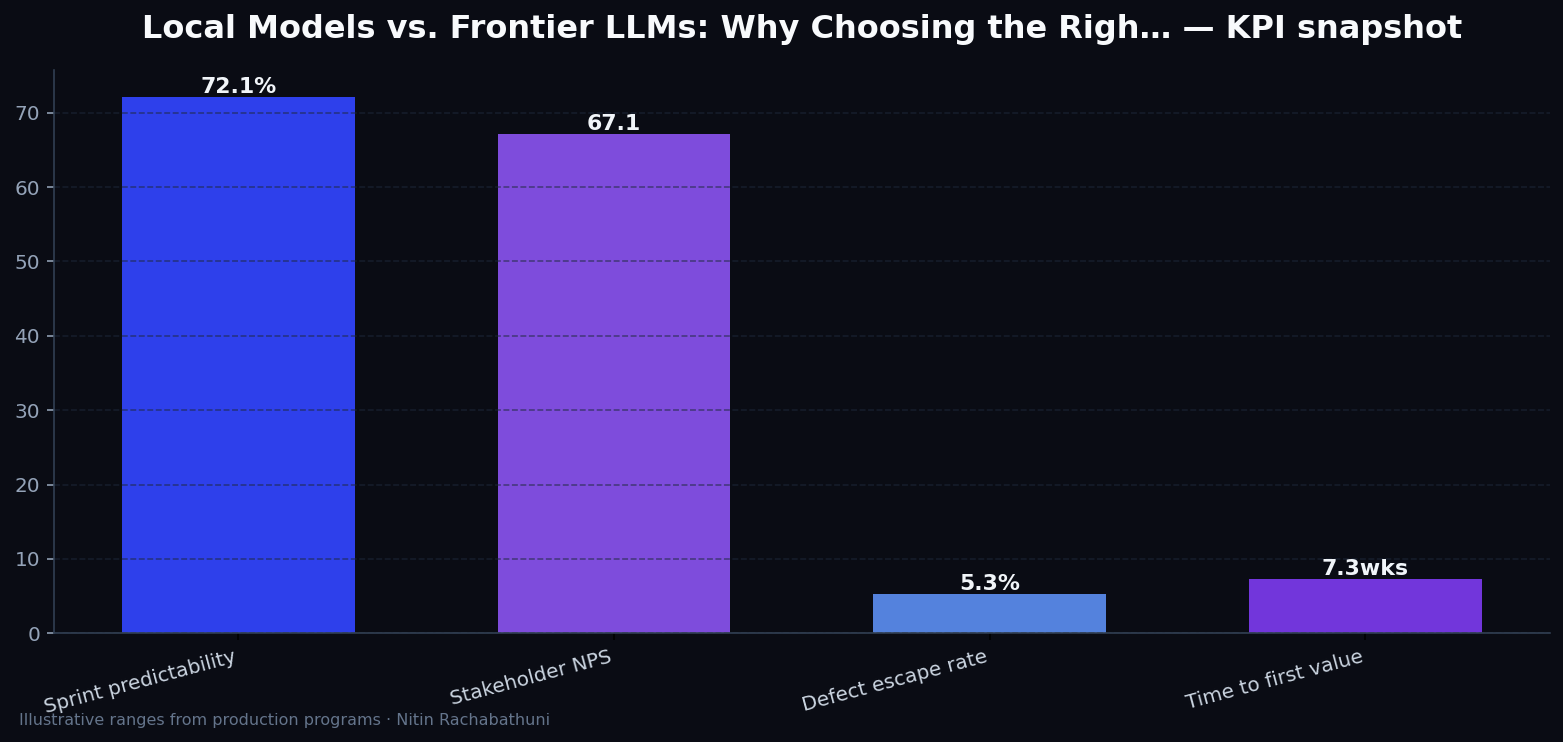
Illustrative consulting KPI ranges observed on programs like “Local Models vs. Frontier LLMs: Why Choosing the Righ…” — validate against your own telemetry before setting SLOs. Methodology: production-like staging traces + weekly review with product and ops.
Architecture flow

Code sketches
/* Integration sketch */
// Local Models vs. Frontier LLMs: Why Choosing the Righ…
export async function rolloutLocalModelsVsFrontierLlmsToolingStrategy() {
  const checks = ["telemetry", "auth", "rollback"];
  return { ok: true, checks };
}
Official references
Related on this site
Article slug: local-models-vs-frontier-llms-tooling-strategy · Engineering notes by Nitin Rachabathuni — MVP in 2 days specialist.