The Shift Toward Native LLM Infrastructure
The landscape of mobile and desktop application development is shifting. For years, integrating Large Language Models (LLMs) like Claude into applications meant a straightforward path: hit a REST endpoint via a cloud provider's API. While this remains the standard for many web-based tools, Apple’s introduction of specific support for foundation models through dedicated Swift packages marks a significant pivot toward "native" integration.
By providing a structured framework specifically designed for Apple platforms, developers can now weave Claude into native workflows more seamlessly. This isn't just about making it easier to write the code; it is about aligning the AI’s capabilities with the underlying hardware and software ecosystem of iOS, macOS, watchOS, and tvOS. When you move from a generic API call to a platform-specific framework, you are moving toward an architecture where the LLM feels like a component of the OS rather than a remote service being called over the wire.
However, this shift introduces a critical architectural decision for engineering teams: Do we stick with the proven reliability of standard cloud APIs, or do we lean into specialized local platform frameworks? The answer depends on your specific deployment strategy, target audience, and the "feel" you want to provide in the user experience.
Evaluating the Trade-offs: Native vs. Cloud API
When deciding between a native integration via Apple's foundation models framework and a standard cloud API (like Anthropic’s direct API), several technical factors must be weighed.
1. Latency and Connectivity Standard cloud APIs are subject to network variability. If your application requires real-time interaction where every millisecond counts, or if the app needs to function in low-connectivity environments, a native framework provides an opportunity for more optimized execution paths. By utilizing Swift packages designed for these models, developers can potentially leverage local optimizations that standard HTTP requests cannot touch.
2. Ecosystem Integration Apple’s foundation models framework is built with the developer's "native" experience in mind. This means better integration with system features like CoreML, localized data handling, and specific Swift concurrency patterns. If your app relies heavily on Apple-specific UI components or background tasks, a native path often reduces the friction of translating between two different environments (the LLM environment and the mobile OS).
3. Consistency vs. Optimization The primary advantage of a standard cloud API is consistency. Whether your user is on an iPhone, a Windows PC, or a Linux server, the prompt logic remains identical because it hits the same remote endpoint. The native framework approach offers optimization for the Apple ecosystem but requires you to manage the nuances of platform-specific implementation.
Engineering Best Practices for LLM Deployment
Regardless of which path you choose—native integration or cloud API—the "how" of your deployment is just as important as the "where." Moving from a prototype to a production-ready feature requires rigorous engineering discipline.
Benchmark on Actual Data One common pitfall in AI development is relying on marketing charts for performance metrics. When choosing between models or integration methods, you must benchmark based on your specific prompt mix and token counts. A model that performs beautifully on short "hello" prompts might struggle with the complex system instructions required for your specific use case.
Telemetry and Versioning In a production environment, visibility is everything. You should log both the Model ID and the Prompt Version for every single call made by a user. This allows you to identify exactly which version of an LLM or which iteration of a prompt caused a failure or produced a hallucination. If you change your system prompt but keep the same model name, your logs must reflect that distinction so you can debug effectively.
Canary Deployments Never roll out a new LLM integration to 100% of your users at once. Use canary deployments on low-risk endpoints first. This allows you to monitor for unexpected behaviors or high latency in a controlled environment before it impacts the entire user base. If something breaks, only a small percentage of users are affected while you roll back and iterate.
Building Your MVP with Confidence
Navigating the complexities of LLM integration—whether through Apple's specialized frameworks or standard cloud APIs—requires a clear roadmap from the start. The goal is to build a product that feels stable, responsive, and valuable to the end user. Choosing the right infrastructure early can save hundreds of hours in refactoring later.
If you are looking to move your project from an idea to a functional MVP and need help navigating these technical trade-offs or building out your initial architecture, contact me for expert guidance. We can work together to determine the best integration path for your specific product goals.
Frequently Asked Questions
What is the difference between using a generic API and the Apple Foundation Models framework? A generic API connects directly to remote servers, offering high scalability but requiring constant connectivity. The Apple Foundation Models framework allows for tighter integration with native Swift workflows, potentially optimizing how models interact with local device capabilities.
When should a developer choose native platform frameworks over cloud APIs? Choose native frameworks when your application requires deep integration with iOS/macOS features or specific performance optimizations for the Apple ecosystem. Use standard cloud APIs if you need massive scale, multi-platform consistency without local overhead, or high-frequency updates.
How can developers ensure reliability when deploying LLMs in production? Developers should implement robust logging of model IDs and prompt versions for every call. Additionally, using canary deployments on low-risk endpoints allows you to test stability before rolling out updates across your entire user base.
Authoritative references
Consult Next.js documentation, MDN Web Docs, web.dev, Next.js documentation, OWASP Cheat Sheets alongside the official references block below. Cross-check guidance with your compliance, security, and SRE stakeholders before setting SLOs.
Metrics snapshot
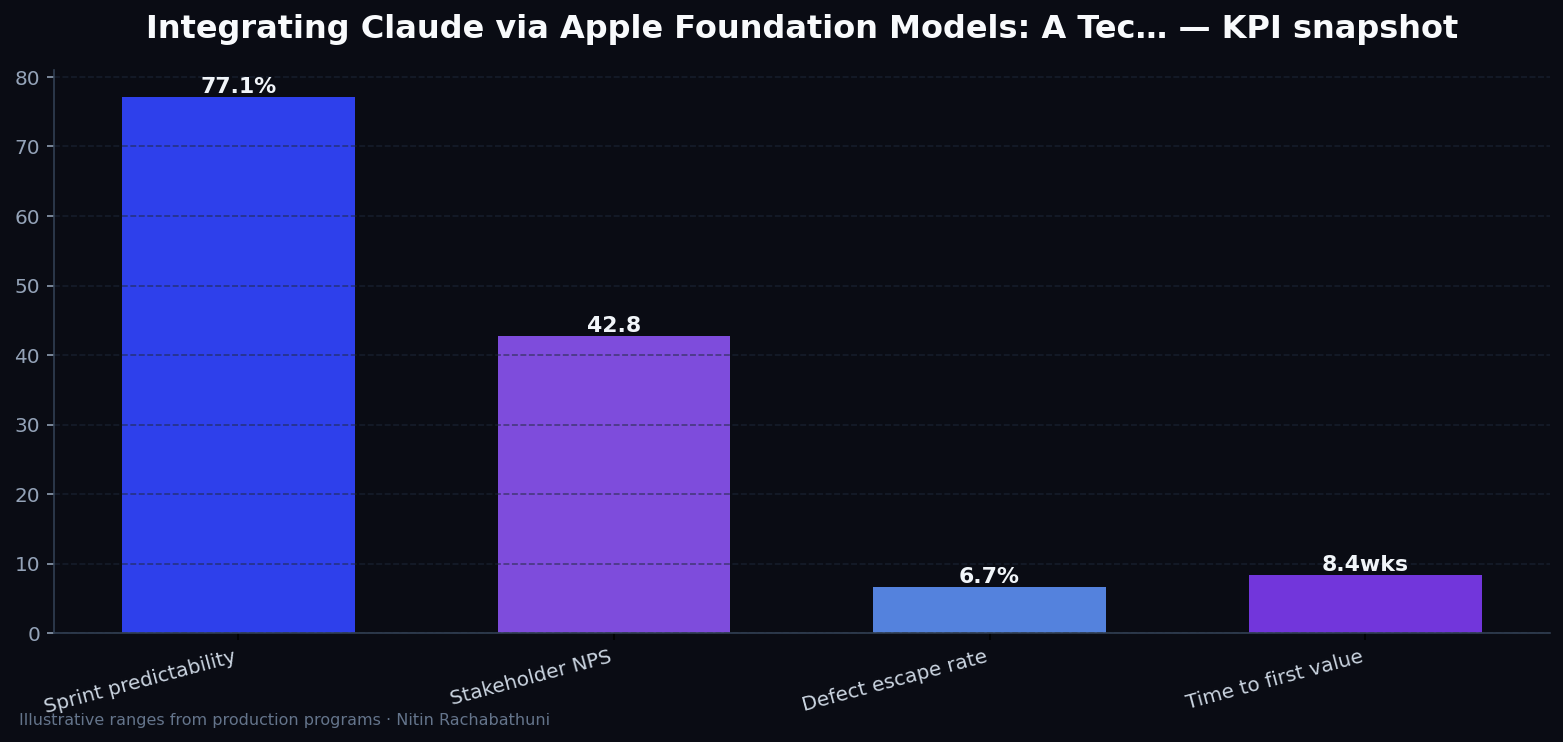
Illustrative consulting KPI ranges observed on programs like “Integrating Claude via Apple Foundation Models: A Tec…” — validate against your own telemetry before setting SLOs. Methodology: production-like staging traces + weekly review with product and ops.
Architecture flow

Code sketches
/* Integration sketch */
// Integrating Claude via Apple Foundation Models: A Tec…
export async function rolloutAppleFoundationModelsClaudeIntegration() {
  const checks = ["telemetry", "auth", "rollback"];
  return { ok: true, checks };
}
Official references
Related on this site
Article slug: apple-foundation-models-claude-integration · Engineering notes by Nitin Rachabathuni — MVP in 2 days specialist.